> ## Documentation Index
> Fetch the complete documentation index at: https://docs.twill.ai/llms.txt
> Use this file to discover all available pages before exploring further.
# Your dev environment
> A long-lived workspace sandbox that runs your whole stack — forked per task, verified against, and yours to inspect over SSH.
Every workspace gets one long-lived cloud sandbox — the **workspace VM** — with all your connected repos cloned, dependencies installed, and dev servers running. Each task runs in a disposable **fork** of that VM, so tasks start from a warm, working state and can't interfere with each other.
This is what makes [verification](/verification) real: the agent doesn't just compile your code, it runs your app.
 ## Automatic setup
On your first task (or whenever the environment breaks), Twill's dev environment agent bootstraps the sandbox by reading your repos:
* Detects package managers from lockfiles (`pnpm-lock.yaml`, `package-lock.json`, `poetry.lock`, …) and frameworks (Next.js, Django, Rails, FastAPI, …)
* Brings up services from `docker-compose.yml` and waits for them to be healthy
* Runs database migrations and seeds
* Starts dev servers in the background, with logs captured
* Uses `.env.example` and your CI config as hints for what the app needs
Fixes made during setup run on the workspace VM itself, so they persist for every future task.
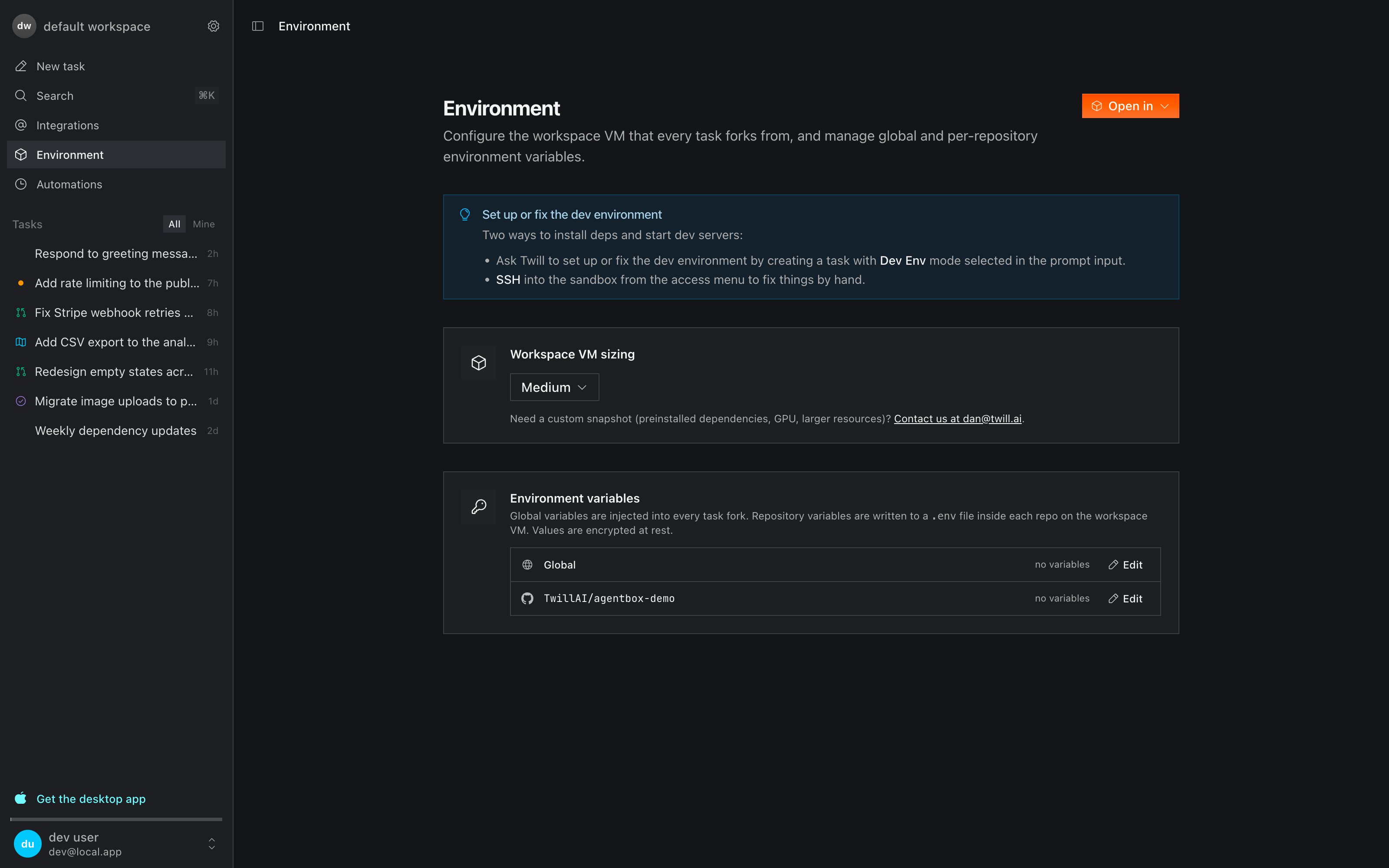
You can trigger this any time: create a task with **Dev Env** mode — "set up
the dev environment", or "the API server won't start, fix it". Changes made in
Dev Env mode persist to the workspace VM.
## Environment variables & secrets
Configure variables on the **Environment** page:
* **Global** variables are injected into every task fork.
* **Per-repository** variables are written to a `.env` file inside that repo on the VM.
Values are encrypted at rest (AES-256-GCM). You can also just ask in a task — "I've added `STRIPE_SECRET_KEY` to the environment, wire it up" — and the agent picks it up.
## Live previews
Each task exposes its running app as a live preview: a browser tab streamed from the task's sandbox, pre-opened on your dev server's port. Open it from the task header to try the change yourself before the PR lands — no tunnel or proxy configuration needed.
Service logs are captured per task under `$TWILL_ENTRYPOINT_LOG_DIR` and surfaced in the task view (`dev-server.log`, `api.log`, `entrypoint.log`).
## SSH access
Click **Open in** on the Environment page (or **SSH & Preview** in a task header) to get a token-scoped SSH command, valid for 60 minutes. Connect from:
* Your terminal (`ssh://` link)
* VS Code or Cursor via Remote-SSH — full editor access to the sandbox
This works for both the workspace VM and any task fork. It's the escape hatch: inspect state, fix something by hand, or take over a task midway. The [CLI](/cli) offers the same via `twill ssh` and `twill fork`.
## What's in the sandbox
Repos are cloned to `/root/workspace/{owner}/{repo}` on an Ubuntu 22.04 base image.
* **Runtimes**: Node.js LTS (via nvm), Python 3 - **Package managers**:
pnpm, npm, uv, pip - **Containers**: Docker Engine with the Compose plugin
(`docker compose up -d`) - **CLI tools**: git, gh, jq, make, curl, wget,
openssl - **Cloud CLIs**: AWS CLI v2, Google Cloud CLI (authenticated via
workspace env vars) - **Browser**: headless Chromium — Puppeteer and
Playwright are auto-detected - **Display**: Xvfb virtual display, which
powers computer-use UI verification
Choose the workspace VM size on the Environment page. Larger sizes and
custom snapshots (preinstalled dependencies, GPUs, bigger resources) are
available on paid plans — see [Pricing](/pricing). For custom snapshots,
contact [dan@twill.ai](mailto:dan@twill.ai).
## Automatic setup
On your first task (or whenever the environment breaks), Twill's dev environment agent bootstraps the sandbox by reading your repos:
* Detects package managers from lockfiles (`pnpm-lock.yaml`, `package-lock.json`, `poetry.lock`, …) and frameworks (Next.js, Django, Rails, FastAPI, …)
* Brings up services from `docker-compose.yml` and waits for them to be healthy
* Runs database migrations and seeds
* Starts dev servers in the background, with logs captured
* Uses `.env.example` and your CI config as hints for what the app needs
Fixes made during setup run on the workspace VM itself, so they persist for every future task.
You can trigger this any time: create a task with **Dev Env** mode — "set up
the dev environment", or "the API server won't start, fix it". Changes made in
Dev Env mode persist to the workspace VM.
## Environment variables & secrets
Configure variables on the **Environment** page:
* **Global** variables are injected into every task fork.
* **Per-repository** variables are written to a `.env` file inside that repo on the VM.
Values are encrypted at rest (AES-256-GCM). You can also just ask in a task — "I've added `STRIPE_SECRET_KEY` to the environment, wire it up" — and the agent picks it up.
## Live previews
Each task exposes its running app as a live preview: a browser tab streamed from the task's sandbox, pre-opened on your dev server's port. Open it from the task header to try the change yourself before the PR lands — no tunnel or proxy configuration needed.
Service logs are captured per task under `$TWILL_ENTRYPOINT_LOG_DIR` and surfaced in the task view (`dev-server.log`, `api.log`, `entrypoint.log`).
## SSH access
Click **Open in** on the Environment page (or **SSH & Preview** in a task header) to get a token-scoped SSH command, valid for 60 minutes. Connect from:
* Your terminal (`ssh://` link)
* VS Code or Cursor via Remote-SSH — full editor access to the sandbox
This works for both the workspace VM and any task fork. It's the escape hatch: inspect state, fix something by hand, or take over a task midway. The [CLI](/cli) offers the same via `twill ssh` and `twill fork`.
## What's in the sandbox
Repos are cloned to `/root/workspace/{owner}/{repo}` on an Ubuntu 22.04 base image.
* **Runtimes**: Node.js LTS (via nvm), Python 3 - **Package managers**:
pnpm, npm, uv, pip - **Containers**: Docker Engine with the Compose plugin
(`docker compose up -d`) - **CLI tools**: git, gh, jq, make, curl, wget,
openssl - **Cloud CLIs**: AWS CLI v2, Google Cloud CLI (authenticated via
workspace env vars) - **Browser**: headless Chromium — Puppeteer and
Playwright are auto-detected - **Display**: Xvfb virtual display, which
powers computer-use UI verification
Choose the workspace VM size on the Environment page. Larger sizes and
custom snapshots (preinstalled dependencies, GPUs, bigger resources) are
available on paid plans — see [Pricing](/pricing). For custom snapshots,
contact [dan@twill.ai](mailto:dan@twill.ai).